Music streaming has been one of the cleanest examples of a category-wide tech win in the last fifteen years. Almost any song, anywhere, on any device, for a flat monthly fee. Apple Music, Spotify, YouTube Music, TIDAL, Deezer, Qobuz, and a long tail of regional and audiophile services all sit on roughly the same licensing rails, which is why their catalogues overlap so heavily. The functional differences between platforms now live mostly in user experience, audio quality tiers, recommendation engines, and pricing.
What did not get solved for most of that decade was portability. The audio was streaming, but the user’s actual library was not. Playlists, liked songs, song order, saved albums, and years of carefully curated mixes lived inside a single platform’s data model. Move to a different service and the work either started over from scratch or did not move at all. That single piece of friction is the reason so many users stayed on platforms they had stopped enjoying. The platform did not have to keep earning the subscription. The library was holding them in place.
What changed
A small category of cross-platform tools matured to the point where the friction is essentially gone. The category is narrow on purpose. The job is to read the user’s data on one streaming service, match each track against the catalogue of another, and reconstruct the library on the destination side with playlists, song order, and metadata intact. It is not a glamorous problem to solve, but the engineering is harder than it looks. Catalogue identifiers differ between services. Live versions, deluxe editions, regional re-releases, and remastered tracks all need to be reconciled. Authorisation flows have to work cleanly with each service’s API. And the user expects the whole thing to finish in minutes, not days.
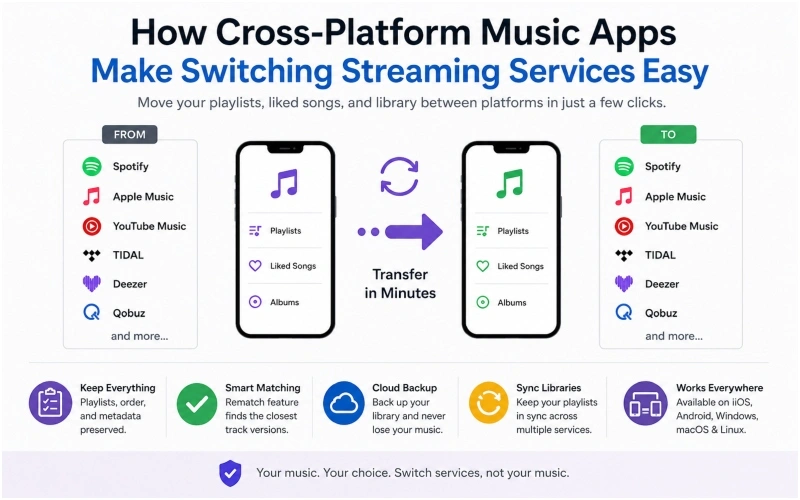
Apps like FreeYourMusic operate in this category specifically. They let users move playlists, albums, and full libraries between Spotify, Apple Music, YouTube Music, TIDAL, Deezer, Qobuz, and a long list of additional services in a few clicks. Playlist titles, song order, and multiple playlists at once are preserved during the transfer. A built-in rematch feature surfaces any tracks that did not match cleanly so the user can pick the closest version. The app runs on iOS, Android, Windows, macOS, and Linux, and a single licence covers multiple accounts, which is useful for households or producers who manage more than one library.
The free tier covers the first 600 songs, which is enough for a casual listener to test the workflow end to end before deciding whether to upgrade for unlimited transfers, cloud backup, and ongoing playlist sync.
Why users actually switch services
The reasons cluster into four patterns.
Audio quality. Listeners who upgrade headphones, DACs, or home audio systems often discover that their current service is the weak link. Lossless and high-resolution tiers are not available everywhere, and the upgrade triggers a platform move.
Pricing. Family plans, student rates, phone carrier bundles, and credit card promotions change the economics enough to justify a switch. The actual cost gap between services can shift several times a year depending on what is being bundled.
Catalogue and exclusives. Specific artist exclusives, regional catalogues, podcast availability, and live recording libraries still vary between services.
User experience. The recommendation engine, the desktop app, lock screen behaviour, offline downloads, and integrations with car infotainment systems and smart speakers all influence which platform feels right after a few months of daily use.
What every one of these reasons shares is that the platform decision itself is usually quick. The barrier was always the library, not the choice.
What a transfer actually looks like step by step
The user opens the cross-platform app on phone or desktop. The source streaming service is connected through its standard authorisation flow. The destination service is connected the same way. The app reads the source library, including playlists, liked songs, and saved albums, then queues the transfer.
Tracks that match cleanly in the destination catalogue move across with their original metadata. Tracks that did not match are flagged for review through the rematch tool. This is the step that separates a clean library from a library with gaps. Live recordings, regional re-releases, deluxe editions, and remastered cuts often need a quick human decision because the underlying catalogues describe them differently.
For most users with a few thousand songs, the whole process takes minutes rather than hours. Ongoing sync, if enabled, keeps the libraries aligned while the user runs two services in parallel during a trial period.
Where this category fits in the wider tech stack
Cross-platform music apps sit alongside the small but useful category of “infrastructure for things you already own”: password managers that move credentials between vaults, photo apps that move libraries between cloud services, contact sync tools that bridge phone ecosystems. Each one of these tools solves a single annoying problem that prevents users from making a rational platform choice. The category does not get the headlines that AI or hardware launches do, but it removes a real source of consumer friction.
For listeners, the practical takeaway is that streaming has stopped being a one-way commitment. The library moves. The platform earns the relationship one year at a time. The next service is one short transfer away.
Frequently Asked Questions
Can playlists be transferred between any two streaming services? Most reputable cross-platform transfer apps support the major services, including Spotify, Apple Music, YouTube Music, TIDAL, Deezer, Qobuz, and many others, in either direction.
Does the original library get deleted? No. The transfer copies the library to the destination service. The original service still holds the original playlists unless the user manually removes them.
What happens to songs that are not in the destination catalogue? The transfer app flags those tracks. Most apps include a rematch feature that lets the user choose the closest available version, which is useful for live recordings, regional releases, and deluxe editions.
How long does a transfer take? A typical library of a few thousand songs usually transfers in a few minutes. The exact time depends on library size and internet speed.
Can two streaming services be kept running at the same time? Yes. Many users run two services in parallel during a trial period. Ongoing playlist sync features keep both libraries aligned so neither service falls behind.
Is there a free tier? Many transfer apps offer a free tier covering an initial number of songs, which is usually enough to run the workflow end to end before upgrading to unlimited transfers, cloud backup, or ongoing sync.
Which platforms does the app run on? Modern cross-platform music transfer apps run on iOS, Android, Windows, macOS, and Linux. A single licence often covers more than one device.
Will the song order in a playlist be preserved? Yes. Reliable transfer apps preserve playlist titles, song order, and metadata where possible, with rematch handling small differences between source and destination catalogues.