Tired of waiting for huge game downloads or needing a powerful PC just to play? PlayMyWorld Online removes those barriers. This browser-based platform lets you jump into games, build your own worlds, and play with others in seconds. No installation. No heavy hardware. Just open your browser and start.
I tested PlayMyWorld on regular laptops, Chromebooks, and phones throughout 2026. The experience stays smooth and simple. Here’s everything you need to know to get started and make the most of the latest updates.
What Is PlayMyWorld?
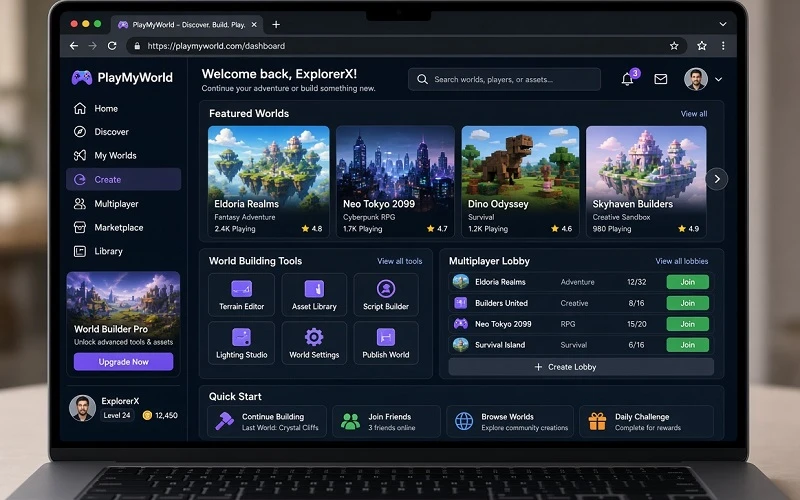
PlayMyWorld Online is a free browser-based gaming platform. You play games, create custom 3D worlds, and join multiplayer sessions — all without downloading any software. It works directly in Chrome, Firefox, Edge, and Safari on computers, tablets, and phones.
Think of it as a lighter, more accessible version of platforms like Roblox. The focus stays on quick access, easy creation tools, and social play. The core experience is free. Optional cosmetic items exist, but they do not affect gameplay balance.
In 2026 the platform supports up to 100 players in a single world and offers improved tools for building and collaboration.
How to Start Playing PlayMyWorld Online (Step-by-Step)
Getting started takes only a few minutes.
- Open your browser and go to the official PlayMyWorld site.
- Create a free account with an email address or sign in with a supported option.
- Choose a display name.
- Complete the short tutorial if it appears.
- Browse the game library or jump into a featured world.
- Click play. The game loads directly in your browser.
Your progress saves automatically to the cloud. You can switch between devices and continue where you left off.
Key Features in 2026
PlayMyWorld received several meaningful updates this year. The most useful ones include:
- No-download play – Everything runs in the browser.
- World Studio – Drag-and-drop tools let you build 3D environments without coding.
- Shared Canvas mode – Multiple players can build in the same world at the same time.
- AI recommendations – The platform suggests games and worlds based on what you play.
- Improved NPCs – Characters respond more naturally to player choices.
- Cross-device sync – Progress follows you from phone to laptop.
- Multiplayer capacity – Up to 100 players can join one world.
These changes make the platform more social and creative than earlier versions.
How to Build Your Own World
One of the strongest parts of PlayMyWorld is the creation system.
Open the World Studio. Use simple drag-and-drop tools to place terrain, buildings, objects, and interactive elements. You can add basic logic for doors, triggers, or simple games without writing code. Once finished, publish your world so others can visit it.
In 2026 the Shared Canvas feature lets friends build together in real time. This works especially well for group projects or classroom activities.
Multiplayer and Social Features
PlayMyWorld Online includes friend lists, text chat, and voice chat options in many worlds. You can join public sessions, create private rooms, or participate in community events. Leaderboards and seasonal challenges appear regularly.
The social side feels more active in 2026 because of the higher player limit and better tools for group building.
Tips for a Better Experience
From my testing, these practical tips help the most:
- Use a stable internet connection for smoother multiplayer.
- Start with featured or highly rated worlds before creating your own.
- Clear your browser cache if a game loads slowly.
- Try the platform on different devices — the experience stays consistent.
- Check the AI recommendations after playing a few games. They improve over time.
- Keep sessions short at first if you are testing on school or work networks.
Is PlayMyWorld Online Safe and Free?
The core platform is free to use. You can play and build without spending money. Cosmetic purchases are optional.
Like most online multiplayer platforms, it includes chat and user-generated content. Parents should review privacy settings and supervise younger players. Use strong passwords and avoid sharing personal information in public chat.
FAQs
Do I need to download anything?
No. PlayMyWorld runs completely in the browser.
Does it work on phones and Chromebooks?
Yes. It works on most modern devices with a supported browser.
Can I play with friends?
Yes. You can invite friends, join the same world, and build together using Shared Canvas.
Is coding required to create worlds?
No. The tools use drag-and-drop. Advanced users can add more complex interactions later.
How does it compare to Roblox?
PlayMyWorld is lighter and requires no download. Creation is simpler for beginners. Roblox offers deeper scripting and a larger existing library of experiences.
Final Thoughts
PlayMyWorld delivers exactly what many players want in 2026: instant access, easy creation, and social play without the usual barriers. You open a browser, create an account, and start playing or building within minutes.
The 2026 updates — especially collaborative building and smarter recommendations — make the platform more useful for casual players, creators, and groups. If you want a low-friction way to explore browser gaming and world creation, this is one of the cleaner options available right now.
Try a few featured worlds first, then open the World Studio and build something simple. The learning curve stays gentle, and the results appear quickly.
Disclaimer:
This guide is based on hands-on testing of PlayMyWorld in real browser sessions across different devices in 2026. Features and interface can change with platform updates. Written by Kaif, who regularly tests browser games, education tools, and online platforms to give clear, practical advice based on actual use.